Production software with a clear path from evaluation to purchase
Open any product to review its complete workflow, media, licence model and available purchase options.
TuningSuite for partners
Launch your own file portal. We provide the technology.
Offer ECU and TCU file services under your own brand. Choose a ready portal, connect the automated solution engine or combine both with master support.
Portal rental
Your file portal, ready for customers
A complete portal on your domain with your logo, colours, price list and workflow.
Own brand and domain
Credits, categories and file limits
Customer, file and payment management
Bot rental
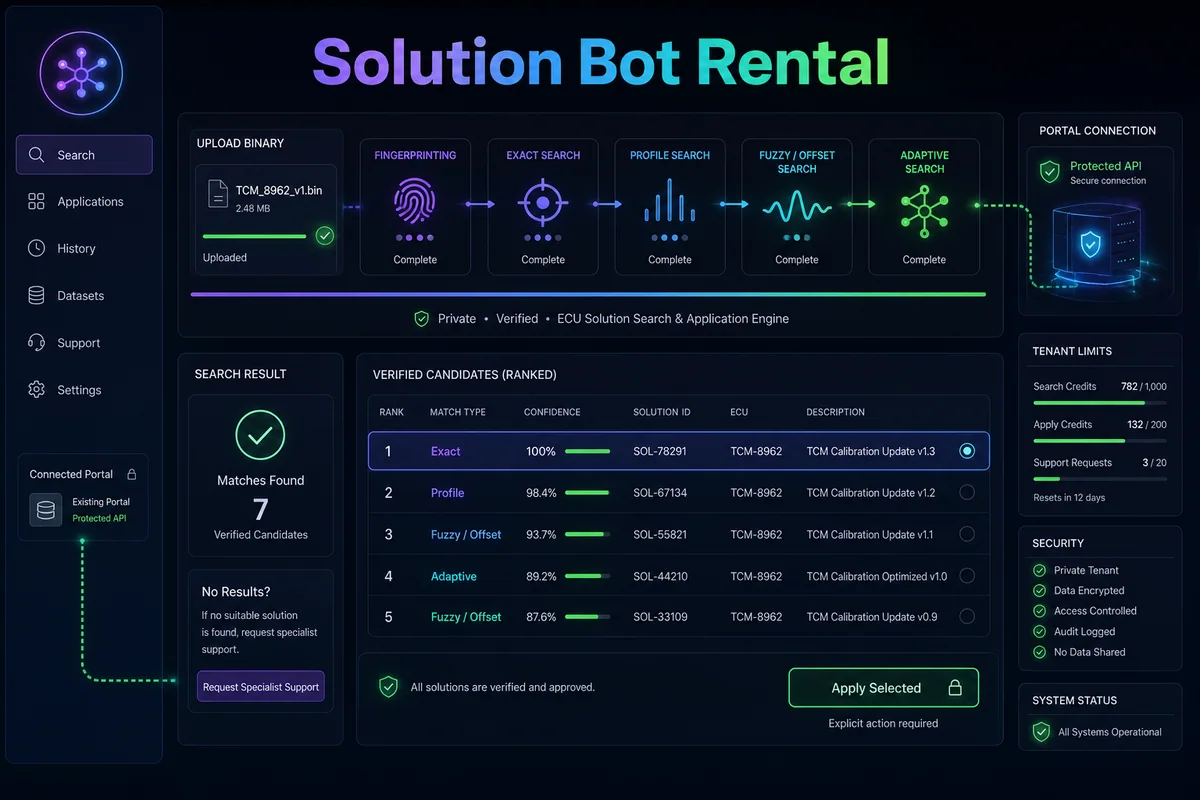
Private automated solution engine
Connect matching, profiles and adaptive search to your existing portal through a secured API.
Cars, trucks, agricultural and more
Usage limits and live statistics
Automatic fallback when no match is found
White label
Your brand in every customer touchpoint
Customers see your company. You decide whether files are handled by the bot, your team or TuningSuite support.
Logo, name, colours and e-mail
Bot-first, owner-first or master flow
Monitoring, escalation and partner reports
Delivery & operations
From requirements to a monitored production service
The rental is delivered as an operating system for your file business, not only a visual template.
01
Scope
Domain, brand, languages, currencies, vehicle categories, services and fulfilment model.
02
Configure
Accounts, credits, packages, limits, payments, automation, support and notifications.
03
Accept
Test upload, exact match, no-solution, manual work, escalation, refund and download paths.
04
Operate
Monitor jobs, limits, errors, payments and backups from role-aware administrator panels.
White labelAutomationManual supportPaymentsNotificationsAudit logsBackupsMonitoring
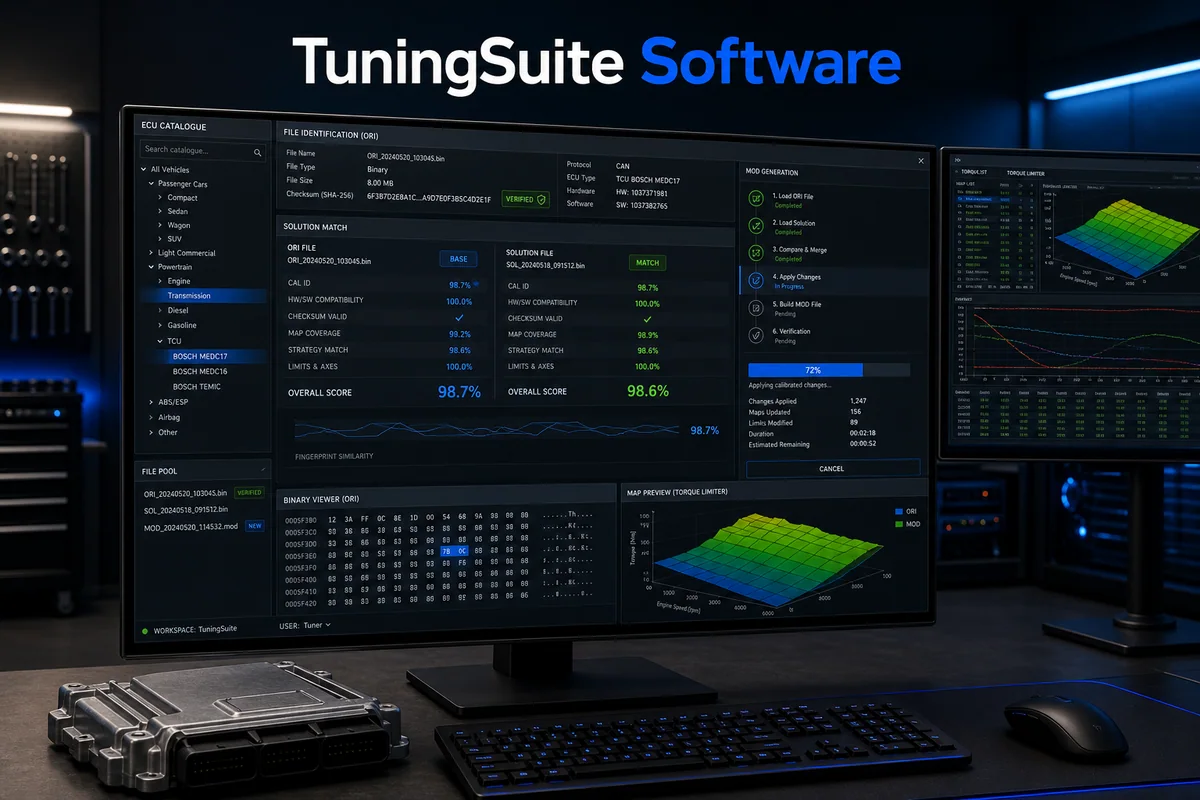
A production Windows application for professional ECU work. The Cars edition includes the licensed passenger vehicle category, exact solution matching, controlled patch generation, checksum workflow and support integration.
How it works — step by step
1Load the original read and verify ECU identification plus SW/HW metadata.
2Search licensed solution databases and inspect the match method before applying work.
3Generate the MOD using the selected verified solution and validate output integrity.
TuningSuite Software FullCars · trucks · agri · construction
Complete edition
TuningSuite Software Full
EUR 2,899one-time
The Full edition is prepared for multi-sector workshops working with cars, trucks, agricultural and construction equipment, quads and other licensed categories. Access remains controlled by the purchased licence and active update entitlement.
How it works — step by step
1Identify the uploaded binary and its vehicle/ECU metadata.
2Search the licensed multi-category solution database.
3Apply only verified solutions and validate the generated MOD.
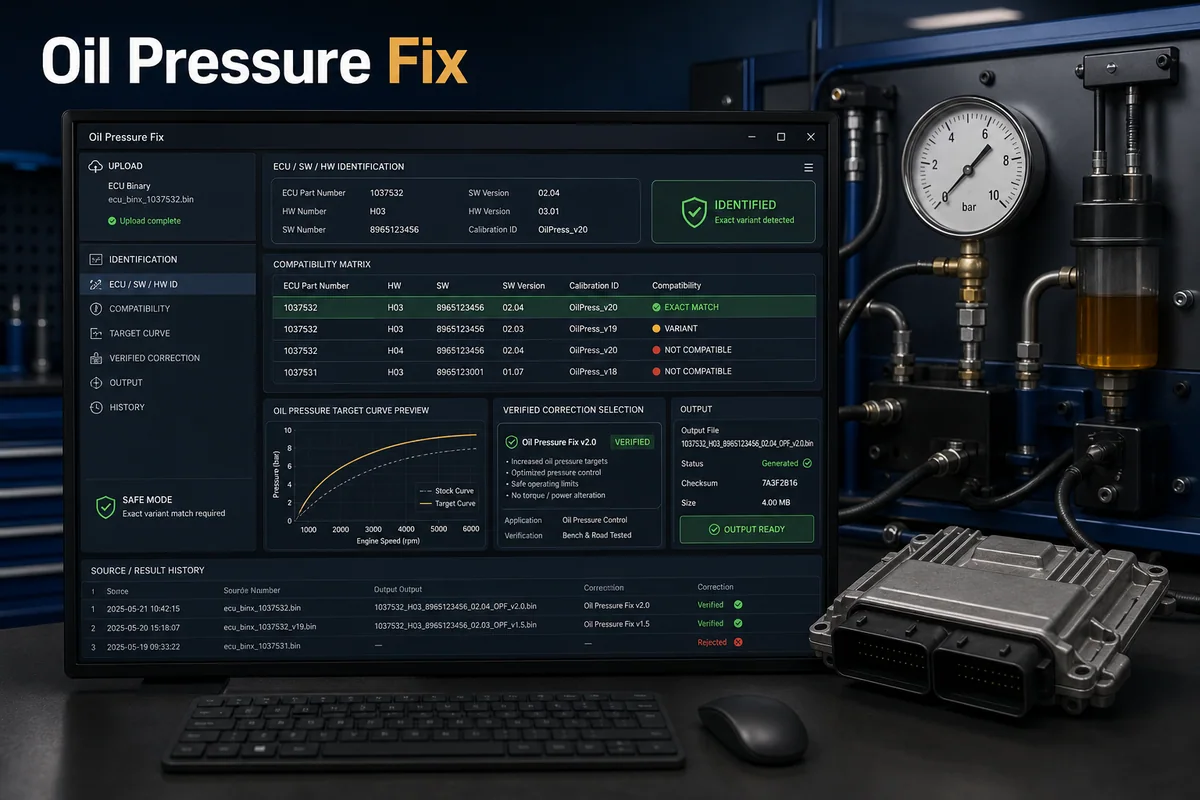
A focused Windows tool for supported oil pressure calibration files. It uses the same production licence service and protected update channel as the wider TuningSuite platform.
How it works — step by step
1Load the ECU read and confirm identification.
2Run exact/profile verification against the licensed correction database.
3Generate the corrected output only when compatibility checks pass.
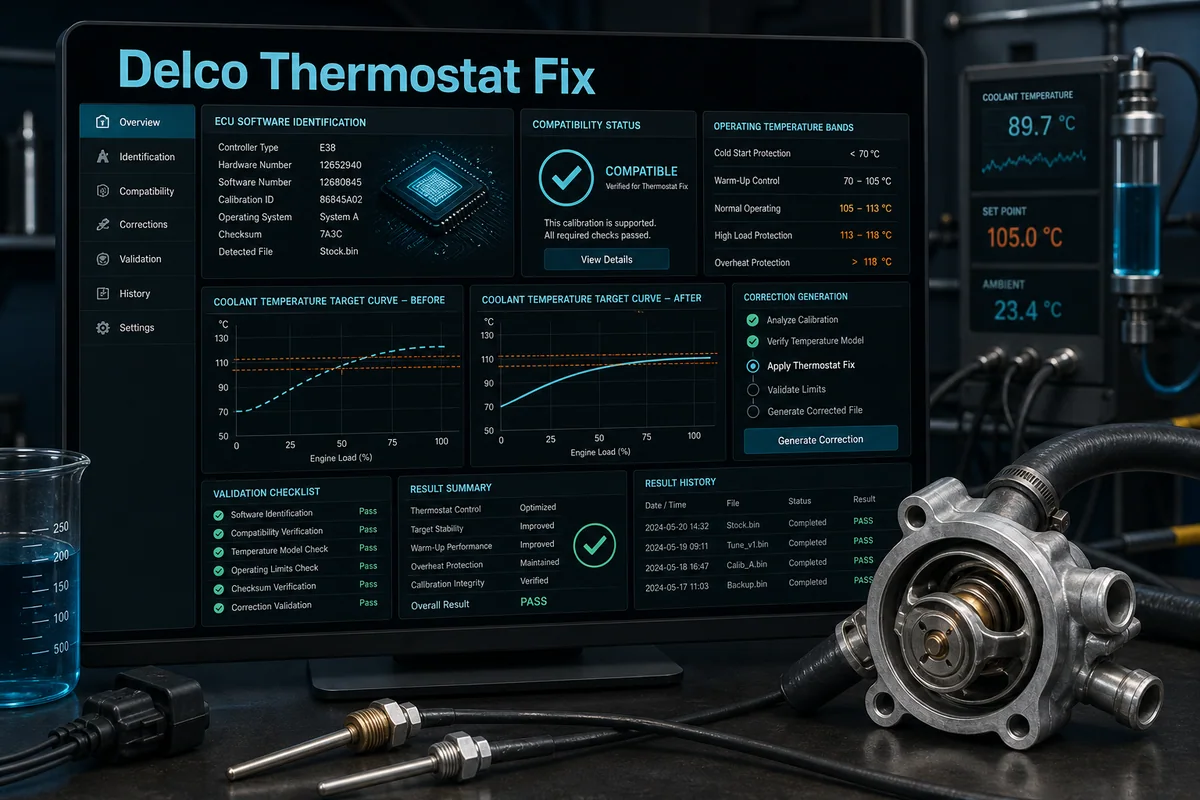
A dedicated Windows workflow for supported Delco thermostat files, with duplicate-result protection, exact file validation and a signed production update channel.
How it works — step by step
1Load and identify the supported Delco ECU read.
2Verify the exact software variant and solution compatibility.
3Generate the corrected output and validate file integrity.
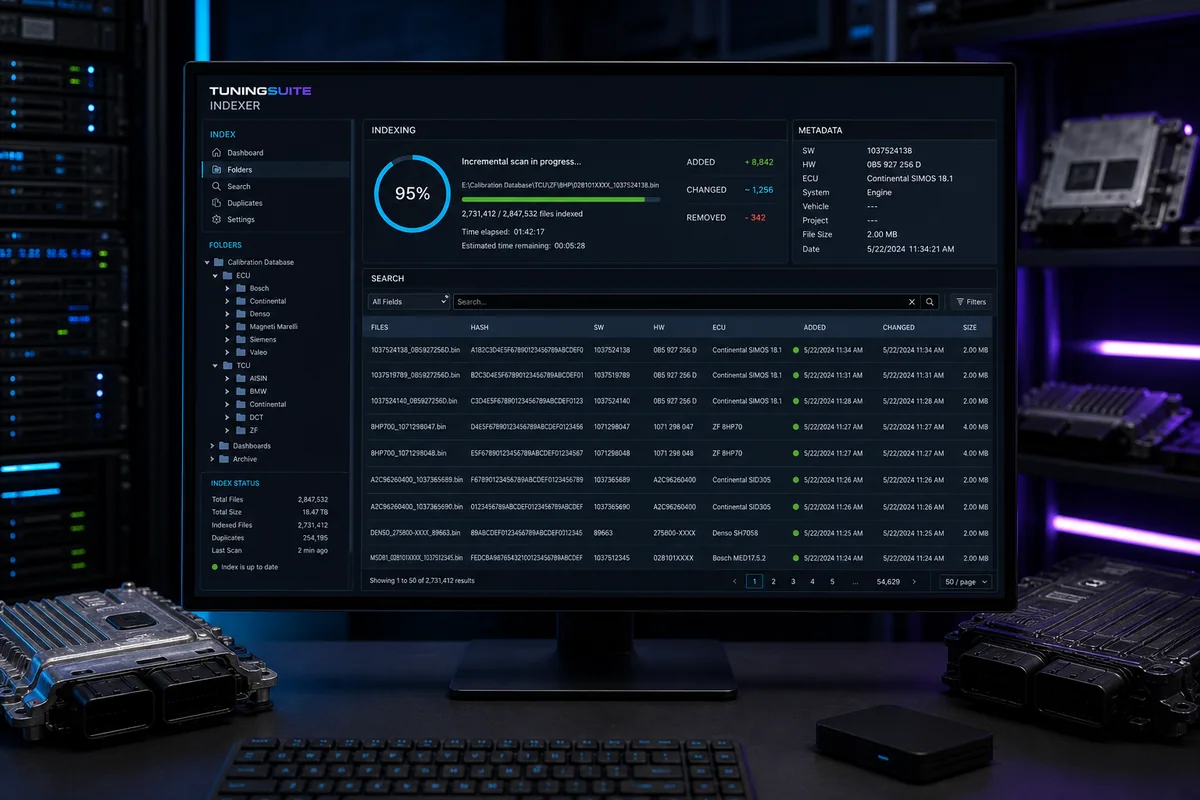
TuningSuite Indexer scans large ECU and TCU collections, extracts supported SW/HW and ECU identifiers, stores cryptographic hashes and builds a normalized local search catalog without changing the source binaries.
How it works — step by step
1Select one or more source collections.
2Scan every supported binary and extract filenames, hashes, ECU family and available SW/HW identifiers.
3Index normalized records for fast search and duplicate detection.
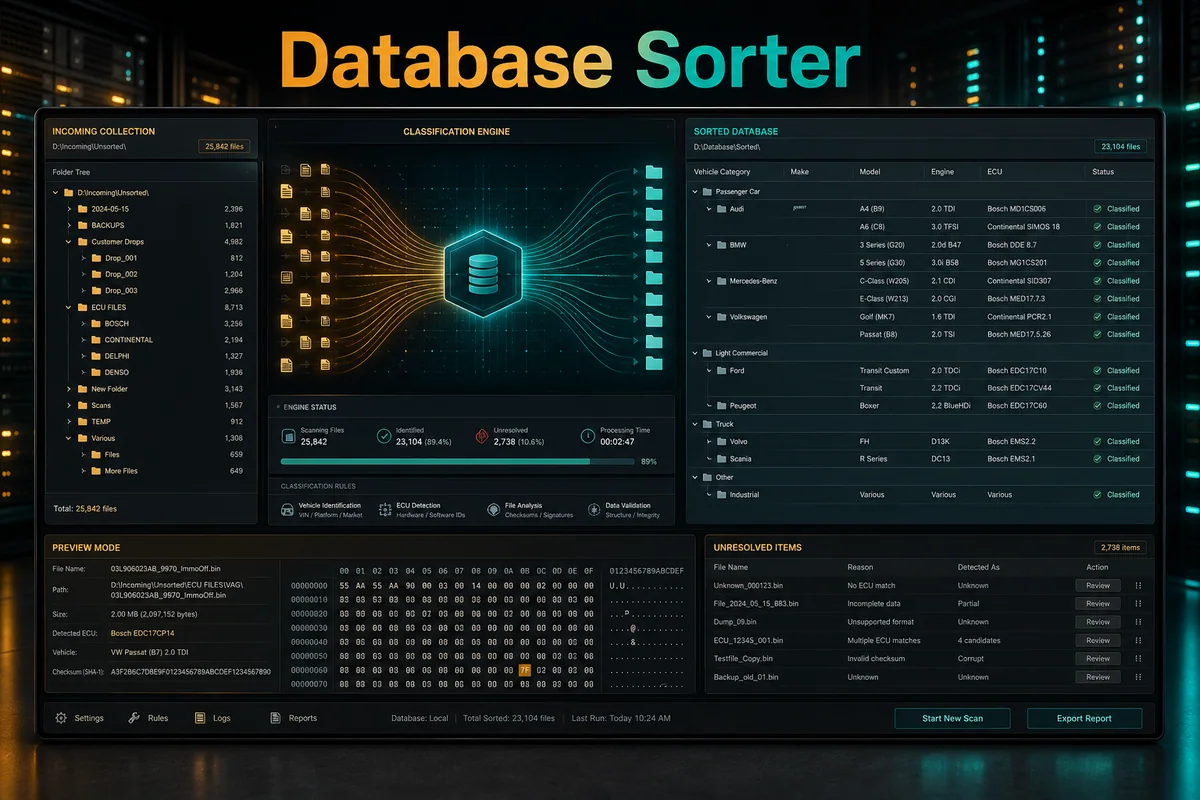
TuningSuite Database Sorter combines folder names, filenames and binary metadata to classify mixed collections by vehicle category, make, model, engine, power, ECU and solution information while preserving fallback logic for older database structures.
How it works — step by step
1Select the unsorted source and an output structure.
2Analyze folder names, filenames and supported binary metadata.
3Preview classification confidence and unresolved items.
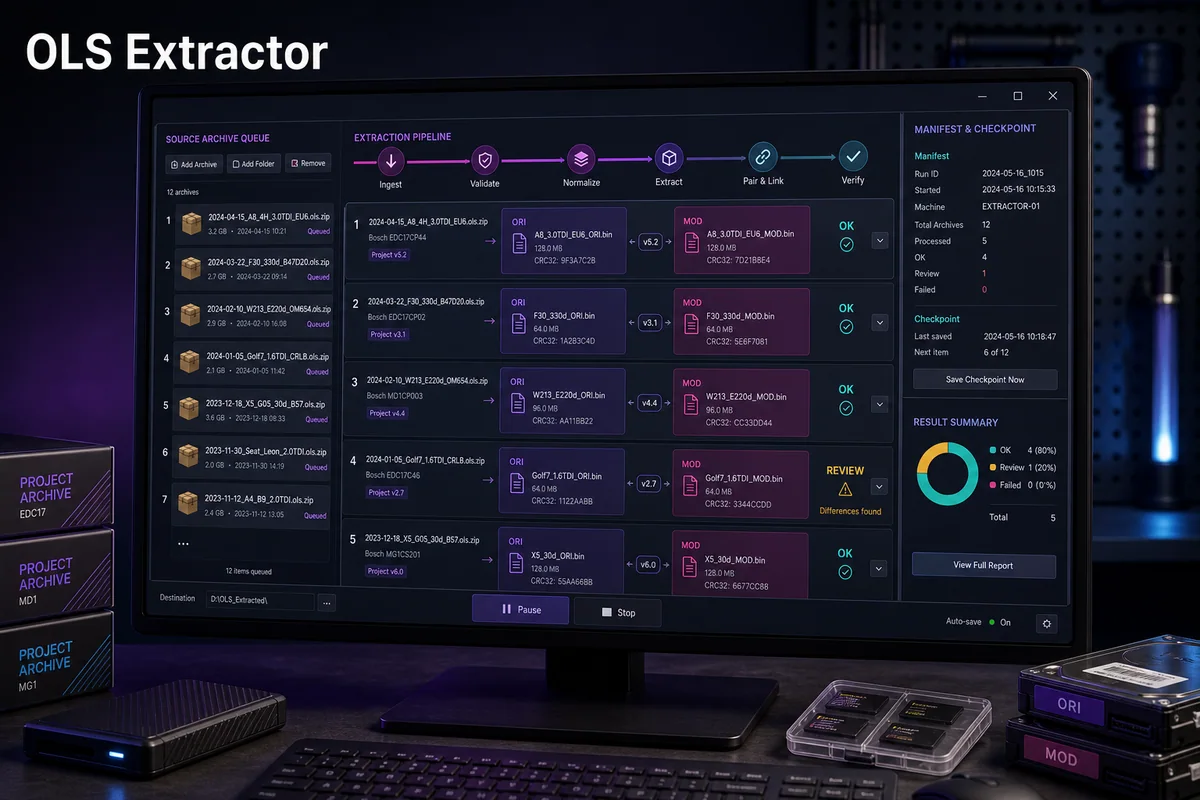
TuningSuite OLS Extractor processes supported OLS collections, extracts eligible project content and describes resulting files using project context plus detected ECU, vehicle and solution metadata for later organization and indexing.
How it works — step by step
1Select the supported OLS source collection and destination.
2Parse project structure and extract eligible binaries or project assets.
3Identify ECU/vehicle metadata and solution labels from project context and file content.
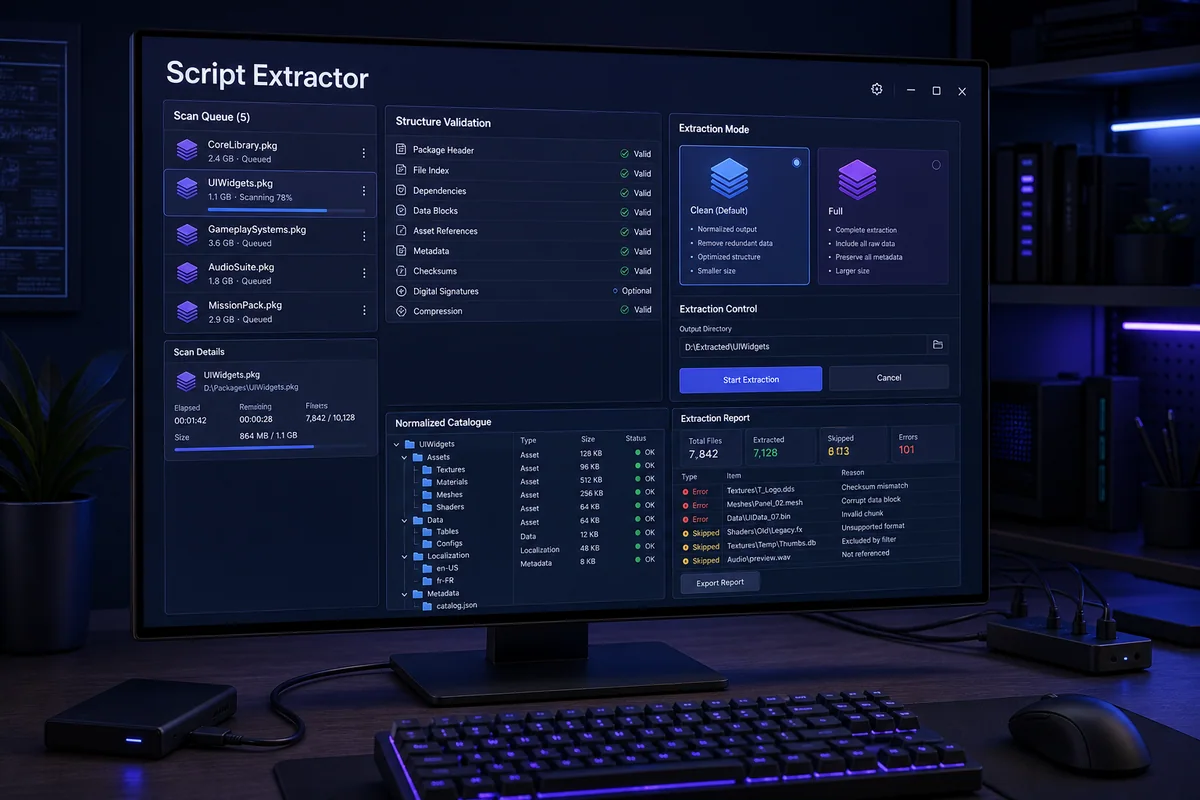
TuningSuite Script Extractor processes supported script collections, validates their structure and creates organized output that can be reviewed, indexed and used in controlled TuningSuite database workflows.
How it works — step by step
1Select a read-only source collection and output directory.
2Scan supported script packages and validate their internal structure.
3Extract and normalize eligible content without modifying the source.
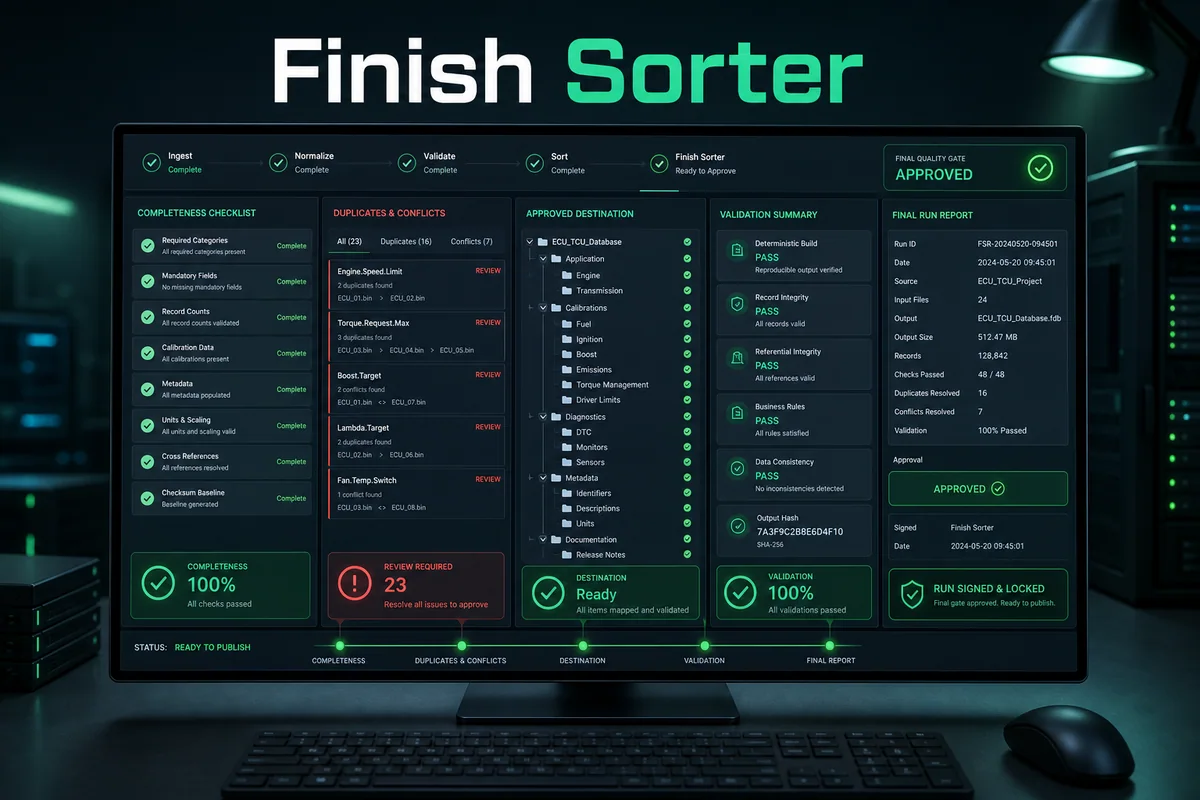
TuningSuite Finish Sorter is the controlled final step after extraction and classification. It validates the prepared collection, detects unresolved or inconsistent output, applies the approved destination structure and produces reviewable evidence without changing the original source database.
How it works — step by step
1Open the prepared output as a new validation run; the original collection remains outside the destination.
2Run completeness, required-field, record-count and cross-reference checks across the whole collection.
3Review every duplicate, conflict and unresolved item instead of allowing an automatic guess.
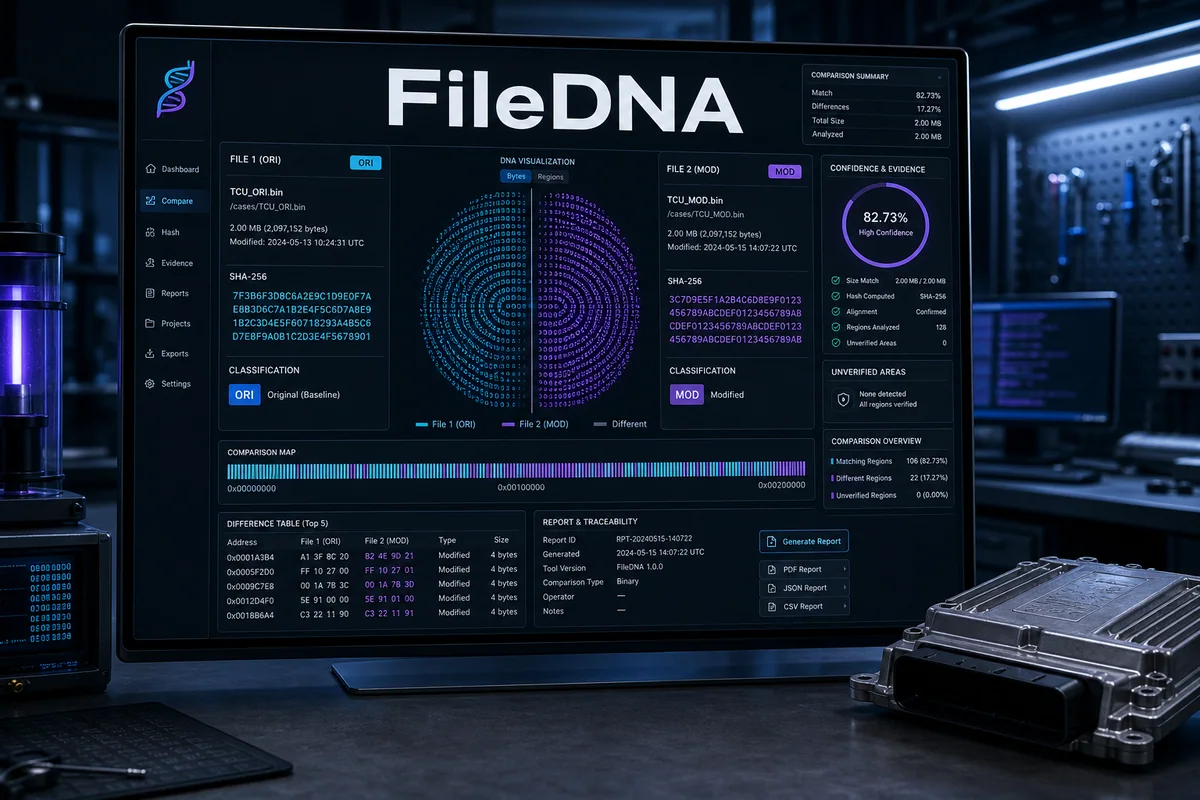
TuningSuite FileDNA builds a technical identity for ECU and TCU files from cryptographic hashes, container validation and comparison evidence. It separates verified ORI, verified MOD and unverified material, supports Intel HEX, S-record and ZIP validation, and records every decision for later audit.
How it works — step by step
1Load the source file or supported HEX, S-record or ZIP container and let the application validate its structure.
2Generate stable hashes and compare them with trusted local or licensed evidence.
3Inspect matching and changed regions, file-size evidence and the proposed ORI/MOD/UNVERIFIED classification.
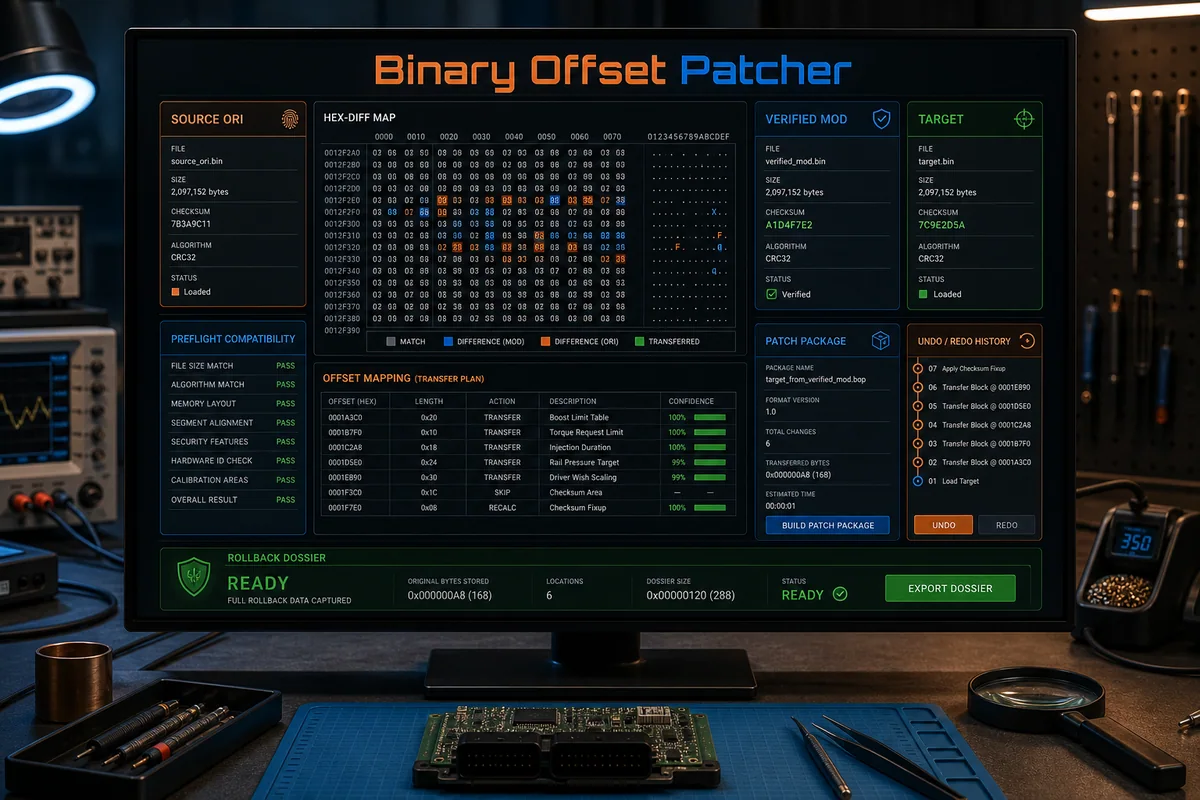
TuningSuite Binary Offset Patcher compares a verified ORI/MOD pair, builds a reviewable patch plan and transfers only approved byte changes to a compatible target. Preflight checks, portable .tsbopatch packages, batch processing, undo/redo and audit reports keep the operation traceable from source evidence to the final dossier.
How it works — step by step
1Load the verified source ORI, its approved MOD and the separate target binary.
2Run compatibility preflight for size, layout, identifiers and mapped calibration regions.
3Review each proposed offset, byte range and confidence result; remove any change that is not justified.
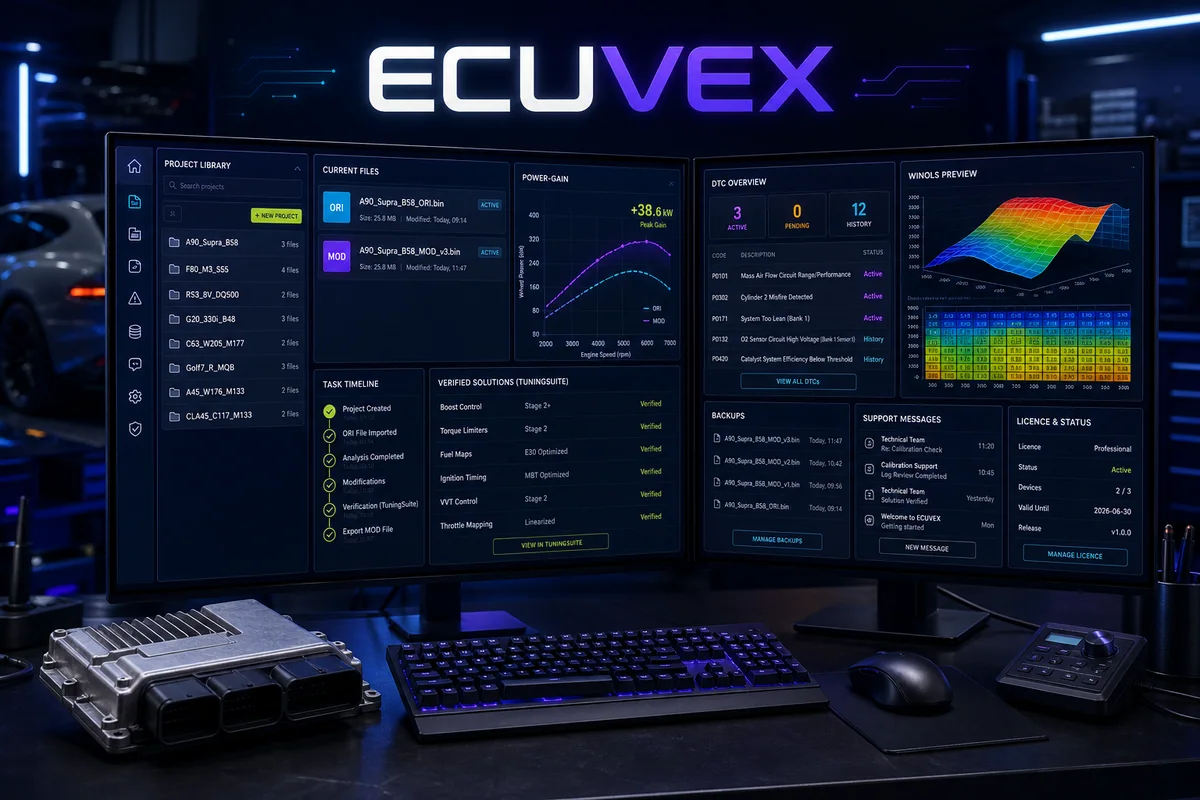
ECUVEX brings the complete workshop path into one Windows workspace: licensed account access, vehicle and ECU identification, solution search, project and job history, controlled MOD application and ORI restore, backups, support, DTC and power data, WinOLS preview and protected updates managed from TuningSuite Web.
How it works — step by step
1Sign in with the licensed TuningSuite account and confirm workstation, entitlement and current release status.
2Create or open a project, attach the ORI read and review vehicle, ECU, SW/HW and file evidence.
3Search licensed solutions, DTC context and power data, then select only the work justified for the exact project.
TuningSuite Flash is the current simulator and technology preview for the planned read/write workflow. It is intended for interface, job and recovery-flow evaluation only; it is not approved for real ECU programming until supported hardware plugins, checksum handling, recovery procedures and bench validation are completed.
How it works — step by step
1Open a designated test profile with no physical ECU connection.
2Simulate interface detection, virtual ECU identification and the planned read sequence.
3Review simulated voltage, communication and job telemetry while rehearsing decision points.
Essential access for passenger-car diagnostics, solutions and occasional tuning work. The plan connects the browser portal and TuningSuite App through one account, one credit balance and one synchronized file history. Vehicle coverage: Cars & vans.
How it works — step by step
1Activate the plan on the same e-mail address used by the TuningSuite account.
2Upload through TuningSuite Web or App and review detected ECU/SW/HW data plus available services.
3Use included plan limits first; eligible overflow work is charged from the shared credit balance.
Higher monthly limits and reduced overflow-credit prices for growing car workshops. The plan connects the browser portal and TuningSuite App through one account, one credit balance and one synchronized file history. Vehicle coverage: Cars & vans.
How it works — step by step
1Activate the plan on the same e-mail address used by the TuningSuite account.
2Upload through TuningSuite Web or App and review detected ECU/SW/HW data plus available services.
3Use included plan limits first; eligible overflow work is charged from the shared credit balance.
Workshop-scale car processing with generous tuning limits and included credits. The plan connects the browser portal and TuningSuite App through one account, one credit balance and one synchronized file history. Vehicle coverage: Cars & vans.
How it works — step by step
1Activate the plan on the same e-mail address used by the TuningSuite account.
2Upload through TuningSuite Web or App and review detected ECU/SW/HW data plus available services.
3Use included plan limits first; eligible overflow work is charged from the shared credit balance.
Maximum passenger-car capacity and the best overflow-credit tariff for busy teams. The plan connects the browser portal and TuningSuite App through one account, one credit balance and one synchronized file history. Vehicle coverage: Cars & vans.
How it works — step by step
1Activate the plan on the same e-mail address used by the TuningSuite account.
2Upload through TuningSuite Web or App and review detected ECU/SW/HW data plus available services.
3Use included plan limits first; eligible overflow work is charged from the shared credit balance.
Entry plan for workshops servicing both passenger cars and trucks. The plan connects the browser portal and TuningSuite App through one account, one credit balance and one synchronized file history. Vehicle coverage: Cars & vans, Trucks.
How it works — step by step
1Activate the plan on the same e-mail address used by the TuningSuite account.
2Upload through TuningSuite Web or App and review detected ECU/SW/HW data plus available services.
3Use included plan limits first; eligible overflow work is charged from the shared credit balance.
Balanced car-and-truck capacity with improved overflow-credit pricing. The plan connects the browser portal and TuningSuite App through one account, one credit balance and one synchronized file history. Vehicle coverage: Cars & vans, Trucks.
How it works — step by step
1Activate the plan on the same e-mail address used by the TuningSuite account.
2Upload through TuningSuite Web or App and review detected ECU/SW/HW data plus available services.
3Use included plan limits first; eligible overflow work is charged from the shared credit balance.
High-volume car and truck processing designed for professional file-service teams. The plan connects the browser portal and TuningSuite App through one account, one credit balance and one synchronized file history. Vehicle coverage: Cars & vans, Trucks.
How it works — step by step
1Activate the plan on the same e-mail address used by the TuningSuite account.
2Upload through TuningSuite Web or App and review detected ECU/SW/HW data plus available services.
3Use included plan limits first; eligible overflow work is charged from the shared credit balance.
Maximum car-and-truck limits and the strongest overflow-credit discount. The plan connects the browser portal and TuningSuite App through one account, one credit balance and one synchronized file history. Vehicle coverage: Cars & vans, Trucks.
How it works — step by step
1Activate the plan on the same e-mail address used by the TuningSuite account.
2Upload through TuningSuite Web or App and review detected ECU/SW/HW data plus available services.
3Use included plan limits first; eligible overflow work is charged from the shared credit balance.
All vehicle categories in one plan for diversified workshops and new file services. The plan connects the browser portal and TuningSuite App through one account, one credit balance and one synchronized file history. Vehicle coverage: Cars & vans, Trucks, Agriculture, Construction, Jetski, Quads.
How it works — step by step
1Activate the plan on the same e-mail address used by the TuningSuite account.
2Upload through TuningSuite Web or App and review detected ECU/SW/HW data plus available services.
3Use included plan limits first; eligible overflow work is charged from the shared credit balance.
Expanded all-vehicle access with practical limits and discounted overflow work. The plan connects the browser portal and TuningSuite App through one account, one credit balance and one synchronized file history. Vehicle coverage: Cars & vans, Trucks, Agriculture, Construction, Jetski, Quads.
How it works — step by step
1Activate the plan on the same e-mail address used by the TuningSuite account.
2Upload through TuningSuite Web or App and review detected ECU/SW/HW data plus available services.
3Use included plan limits first; eligible overflow work is charged from the shared credit balance.
Professional capacity across cars, trucks, agriculture, construction, marine and quads. The plan connects the browser portal and TuningSuite App through one account, one credit balance and one synchronized file history. Vehicle coverage: Cars & vans, Trucks, Agriculture, Construction, Jetski, Quads.
How it works — step by step
1Activate the plan on the same e-mail address used by the TuningSuite account.
2Upload through TuningSuite Web or App and review detected ECU/SW/HW data plus available services.
3Use included plan limits first; eligible overflow work is charged from the shared credit balance.
Full Access EnterpriseComplete enterprise capacity
Full access
Full Access Enterprise
EUR 699/month
Highest all-category limits, priority-scale capacity and the best credit tariff. The plan connects the browser portal and TuningSuite App through one account, one credit balance and one synchronized file history. Vehicle coverage: Cars & vans, Trucks, Agriculture, Construction, Jetski, Quads.
How it works — step by step
1Activate the plan on the same e-mail address used by the TuningSuite account.
2Upload through TuningSuite Web or App and review detected ECU/SW/HW data plus available services.
3Use included plan limits first; eligible overflow work is charged from the shared credit balance.
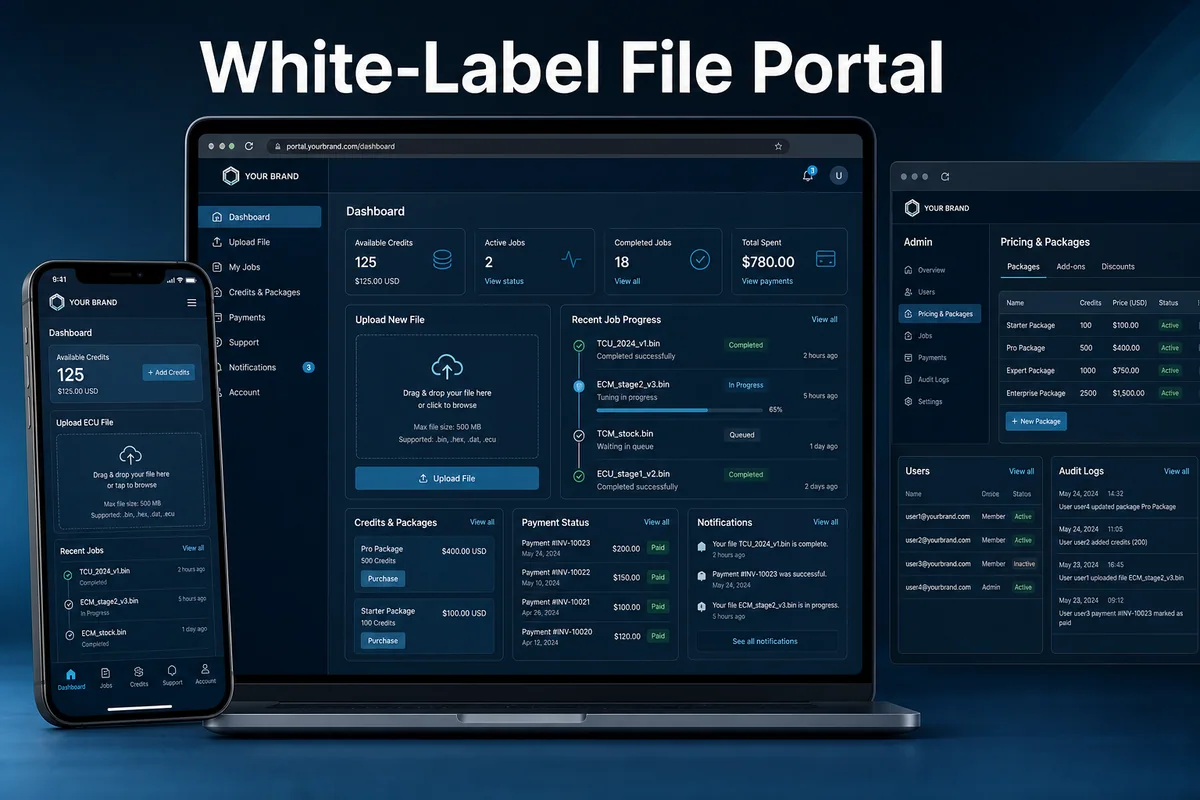
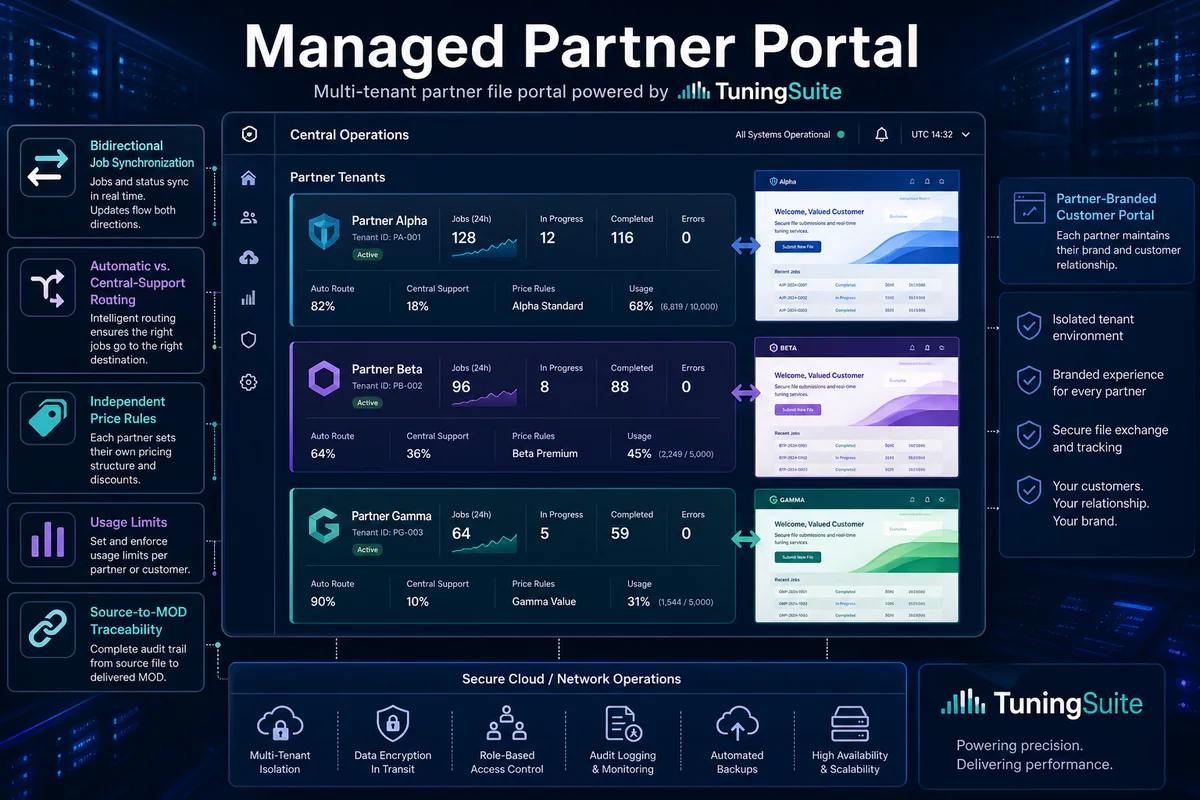
Launch a professional ECU and TCU file-service portal without building the infrastructure from scratch. The portal is fully white-label: your customers see only your brand, while TuningSuite provides hosting, updates, backups, user and credit management, file workflows, DTC and Bosch search tools, notifications and administrator controls. Monthly and annual rental plans are configured individually for the required limits and vehicle categories.
How it works — step by step
1Confirm the domain, branding, languages, currencies, vehicle scope and commercial rules.
2Configure payment providers, packages, limits, automation, support hours and notification channels.
3Validate customer upload, bot processing, manual work, central escalation, refunds and completed-file downloads.
Offer a complete file service under your own brand while TuningSuite works behind the scenes. Available files are processed automatically by the solution bot; unmatched work can be routed to your team or escalated to TuningSuite central support according to your rules. Finished files return through your portal directly to the end customer, with complete status history, notifications and usage reporting.
How it works — step by step
1Define brand, customer roles, vehicle scope, packages and escalation rules.
2Connect the tenant securely to the TuningSuite automation and central-support API.
3Test normal jobs, no-solution cases, escalation timers, central replies and automatic completion.
Use the TuningSuite engine in your existing portal through a protected partner API. Each partner receives separate credentials, vehicle-category and solution permissions, file and rate limits, bot controls, real-time job monitoring and detailed usage statistics. Exact, profile, fuzzy-offset and adaptive matching can be enabled according to the commercial package, with automatic fallback to central support when no verified solution is available.
How it works — step by step
1Agree the caller identity, allowed domains, request schema, limits and supported vehicle categories.
2Integrate signed upload, metadata, requested-service and callback endpoints in a test environment.
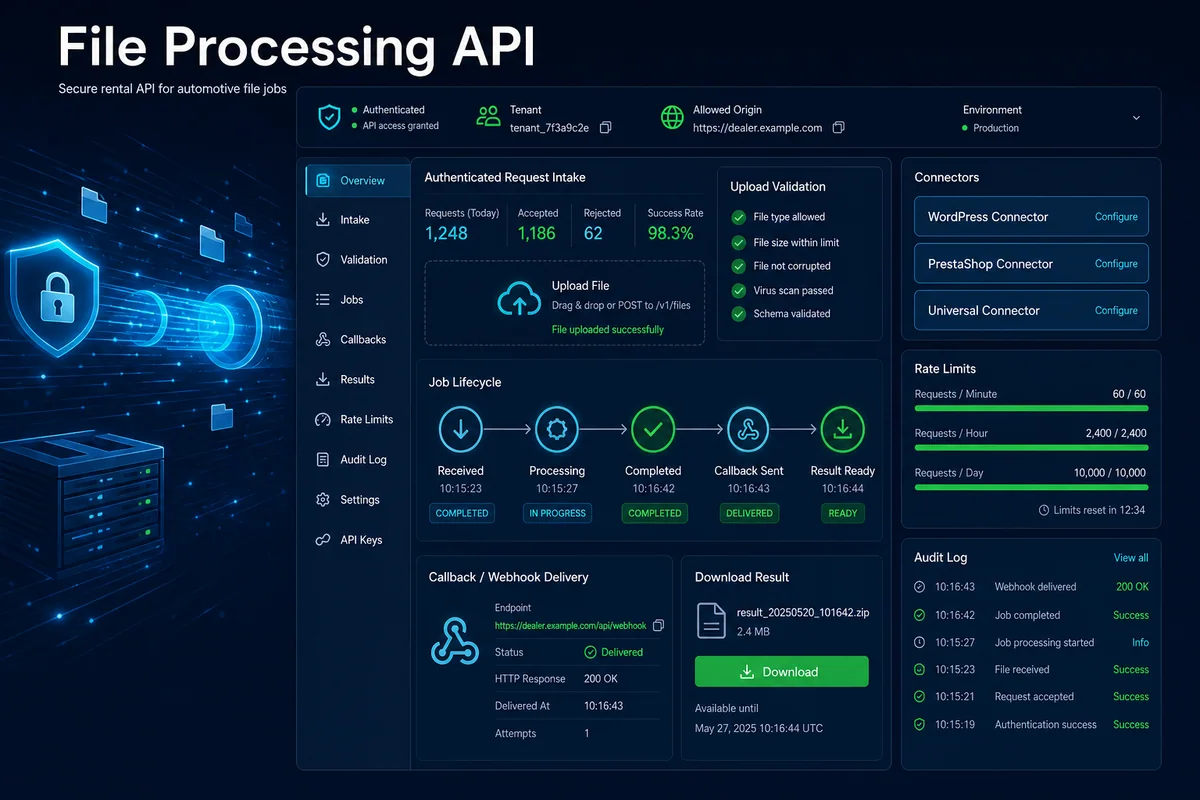
File Processing API connects an external portal, shop or internal system to a tenant-isolated file workflow. Authenticated requests create traceable jobs, validate the submitted binary and metadata, expose controlled status and return paths, and keep usage, limits and errors visible to the owner without handing over the underlying engine.
How it works — step by step
1Define the tenant, allowed origin, file limits, monthly capacity, callbacks and enabled processing scope.
2Install the matching integration package in a test portal and keep the issued secret outside public source code.
3Create an authenticated job with the binary and required ECU/vehicle/service metadata.
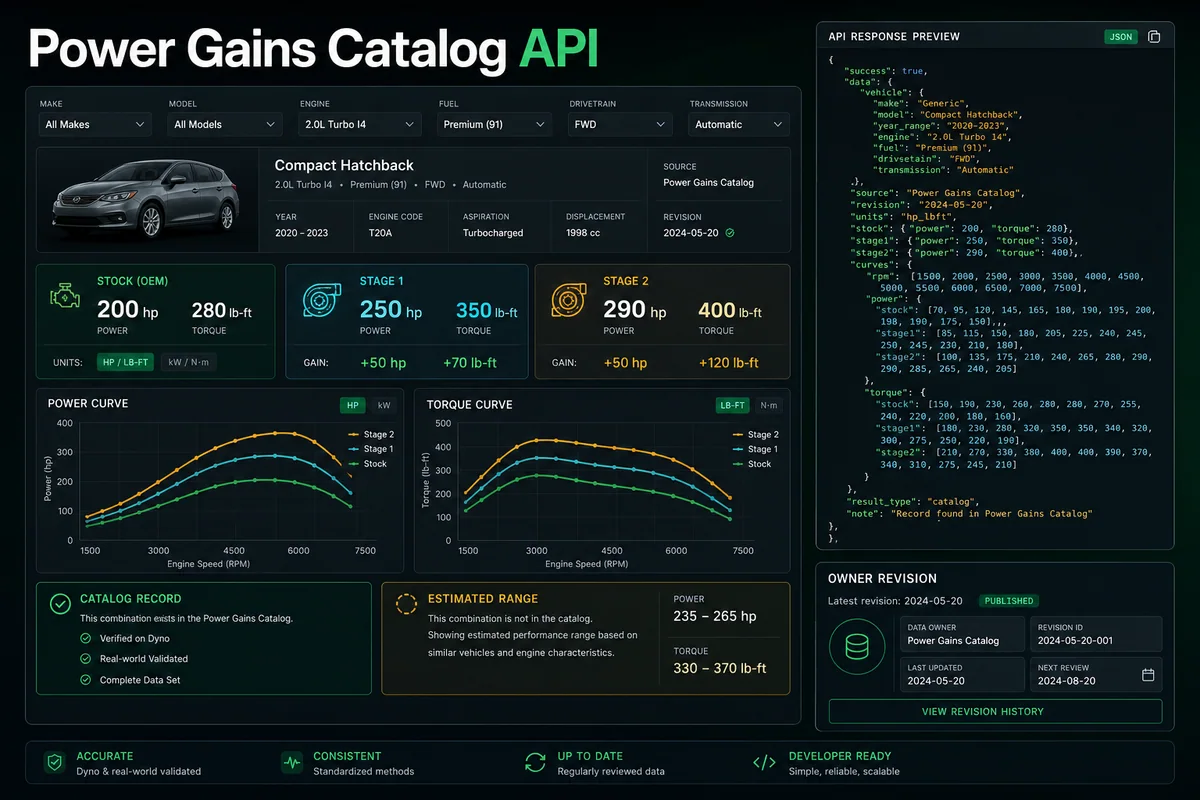
Power Gains Catalog API lets a partner present the managed TuningSuite performance catalogue inside its own website or application. It returns base power and torque plus Stage 1 and Stage 2 values when an exact catalogue match exists, and can return separately labelled estimates when configured, with tenant access, revisions and usage fully controlled by the owner panel.
How it works — step by step
1Configure tenant language, units, accessible vehicle scope and whether labelled estimates are allowed.
2Query the vehicle and engine catalogue using the most specific make, model, generation, engine and power data available.
3Read stock, Stage 1 and Stage 2 power/torque values together with source type, units and catalogue revision.
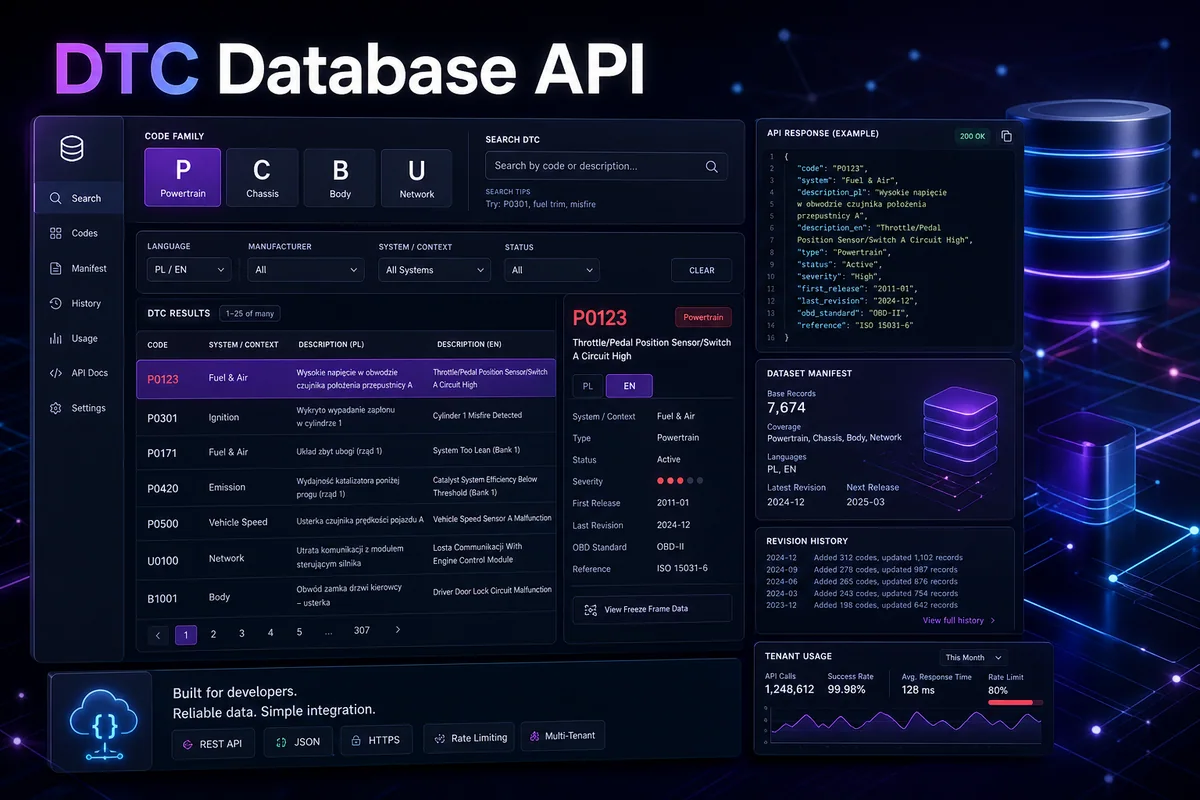
DTC Database API provides authenticated search and filtering across the managed diagnostic trouble-code catalogue. Partners can integrate structured P, C, B and U code families, Polish and English descriptions, diagnostic context and manufacturer-specific information while TuningSuite retains catalogue revision, tenant access and audit control.
How it works — step by step
1Choose tenant languages, searchable fields, family filters and monthly request limits.
2Request the dataset manifest and store its revision so the integration can detect catalogue updates.
3Search or page through P, C, B and U records rather than downloading an uncontrolled private database copy.
Credits are added automatically to the TuningSuite account entered during checkout and can be used in the Web portal and TuningSuite App. This pack contains 10 credits.
How it works — step by step
1Purchase the selected pack using the email assigned to the TuningSuite account.
2Wait for confirmed payment and automatic balance activation.
3Select eligible services; their configured credit cost is shown before submission.
Credits are added automatically to the TuningSuite account entered during checkout and can be used in the Web portal and TuningSuite App. This pack contains 25 credits.
How it works — step by step
1Purchase the selected pack using the email assigned to the TuningSuite account.
2Wait for confirmed payment and automatic balance activation.
3Select eligible services; their configured credit cost is shown before submission.
Credits are added automatically to the TuningSuite account entered during checkout and can be used in the Web portal and TuningSuite App. This pack contains 50 credits.
How it works — step by step
1Purchase the selected pack using the email assigned to the TuningSuite account.
2Wait for confirmed payment and automatic balance activation.
3Select eligible services; their configured credit cost is shown before submission.
Credits are added automatically to the TuningSuite account entered during checkout and can be used in the Web portal and TuningSuite App. This pack contains 100 credits.
How it works — step by step
1Purchase the selected pack using the email assigned to the TuningSuite account.
2Wait for confirmed payment and automatic balance activation.
3Select eligible services; their configured credit cost is shown before submission.
Credits are added automatically to the TuningSuite account entered during checkout and can be used in the Web portal and TuningSuite App. This pack contains 150 credits.
How it works — step by step
1Purchase the selected pack using the email assigned to the TuningSuite account.
2Wait for confirmed payment and automatic balance activation.
3Select eligible services; their configured credit cost is shown before submission.
Credits are added automatically to the TuningSuite account entered during checkout and can be used in the Web portal and TuningSuite App. This pack contains 250 credits.
How it works — step by step
1Purchase the selected pack using the email assigned to the TuningSuite account.
2Wait for confirmed payment and automatic balance activation.
3Select eligible services; their configured credit cost is shown before submission.
Credits are added automatically to the TuningSuite account entered during checkout and can be used in the Web portal and TuningSuite App. This pack contains 350 credits.
How it works — step by step
1Purchase the selected pack using the email assigned to the TuningSuite account.
2Wait for confirmed payment and automatic balance activation.
3Select eligible services; their configured credit cost is shown before submission.
Credits are added automatically to the TuningSuite account entered during checkout and can be used in the Web portal and TuningSuite App. This pack contains 500 credits.
How it works — step by step
1Purchase the selected pack using the email assigned to the TuningSuite account.
2Wait for confirmed payment and automatic balance activation.
3Select eligible services; their configured credit cost is shown before submission.
Credits are added automatically to the TuningSuite account entered during checkout and can be used in the Web portal and TuningSuite App. This pack contains 650 credits.
How it works — step by step
1Purchase the selected pack using the email assigned to the TuningSuite account.
2Wait for confirmed payment and automatic balance activation.
3Select eligible services; their configured credit cost is shown before submission.
Credits are added automatically to the TuningSuite account entered during checkout and can be used in the Web portal and TuningSuite App. This pack contains 750 credits.
How it works — step by step
1Purchase the selected pack using the email assigned to the TuningSuite account.
2Wait for confirmed payment and automatic balance activation.
3Select eligible services; their configured credit cost is shown before submission.
Credits are added automatically to the TuningSuite account entered during checkout and can be used in the Web portal and TuningSuite App. This pack contains 900 credits.
How it works — step by step
1Purchase the selected pack using the email assigned to the TuningSuite account.
2Wait for confirmed payment and automatic balance activation.
3Select eligible services; their configured credit cost is shown before submission.
Credits are added automatically to the TuningSuite account entered during checkout and can be used in the Web portal and TuningSuite App. This pack contains 1000 credits.
How it works — step by step
1Purchase the selected pack using the email assigned to the TuningSuite account.
2Wait for confirmed payment and automatic balance activation.
3Select eligible services; their configured credit cost is shown before submission.